August 22, 2008, 8:22 am · 0 comments · Filed under: Apple, Coda, Web Development, Widgets
Can your web browser do this?
You’ll never get rich digging a ditch, nor building Dashboard widgets.
A Kryptonite™ lock can be defeated in 11 seconds, but you still lock your bike, right?
Gaining Twitter followers is a little like losing weight. You have to try.
Over or under? It’s the age-old question when it comes to the orientation of toilet paper rolls.
I am a web developer, recently returned to the States after 3 years in New Zealand. I’m into my family, photography and frisbee sports.
Nothing will benefit human health and increase chances for survival of life on earth as much as the evolution to a vegetarian diet.
–Albert Einstein
Apple · AppleScript · Business · Coda · CSS · Dashboard · Design · Google · InSTEDD · JavaScript · jQuery · Life · Marketing · Music · New Mexico · New Zealand · Open Source Software · Photography · PHP · Politics · Ruby on Rails · Scree · Subversion (SVN) · Twitter · Usability · Web Development · Widgets
CSS Fast Nav: Because (perception of) speed matters! · Personal Branding for Introverts · Stupid WebKit Tricks · Add an interactive legend to a MarkerManager managed Google Map · Dude. Mikeyy can’t even spell his own name. · Dashboard Widgets for Fun and Profit · Animating your iPhone web application · How-to recover from checksum mismatch errors in SVN · Why Apple can afford to charge so little for Snow Leopard · The first 48 hours of PHP Function Reference, by the numbers
CSS Fast Nav: Because (perception of) speed matters! · When is a global variable not a variable? · Our misguided culture of cool · InSTEDD: Open Source Software that saves lives · Add an interactive legend to a MarkerManager managed Google Map · Personal Branding for Introverts · Moments of Rangitoto · Some Twitter conventions · Why Apple can afford to charge so little for Snow Leopard · Stupid WebKit Tricks
Twitshirt is a tweet on a shirt. Buy the one below or check out my most recent tweets.
Lots to do. Considering pulling a most-of-the-nighter. I'm too old to pull an all-nighter.
See a random Twitshirt-worthy tweet.
80/20 · 90 Seven Design · Alyson Hurt · Andrew Nimick · Apps & Hats · Ben Young · Brian Arnold · Brian Warren · Carl Bolter · Chris Burgess · Christine Morris · Cristina Stoian · Daniel Lyons · Daniel Schwartz · David Hedges · Hamish Campbell · Jochen Daum · John Visser · Joseph McLaughlin · Joshua Sallach · Julian Pistorius · Justine Sanderson · Kalena Jordan · Katie Graham · Kelly Green · Kevin Potis · Mark Bixby · Matt Henry · Method Arts · Morgan Pyne · Peter Michaux · Philip Tellis · Piers Harding · Rebecca Murphey · Reid Givens · Rey Bango · Rhett Anderson · Richard Paul · Rob Pongsajapan · Robin Taylor · Ryan Park · Shaun Lee · Simon Young · Su Yin Khoo · Toni Barrett · Vaughan Rowsell · Vincent ThomĂ© · Voom Studio
My bias is for references over “cookbooks.” I want to know all of my options, not just one way to do something. Show me the why as well as the how and I am happy.
JavaScript: The Good Parts · Object-Oriented JavaScript: Create scalable, reusable high-quality JavaScript applications and libraries · JavaScript: The Definitive Guide · Designing with Web Standards · CSS: The Definitive Guide · Prioritizing Web Usability · The Elements of User Experience · Web ReDesign: Workflow that Works · Don't Make Me Think: A Common Sense Approach to Web Usability
I’ve hosted this website with pair Networks since 1997. They rock.
This blog is powered by…software I wrote.
Feeling generous? Knock yourself out!
If you haven’t checked out Panic’s excellent web development IDE, Coda, you owe it to yourself to download the free trial. It’s a great piece of Mac software from one of the best Mac software shops around.
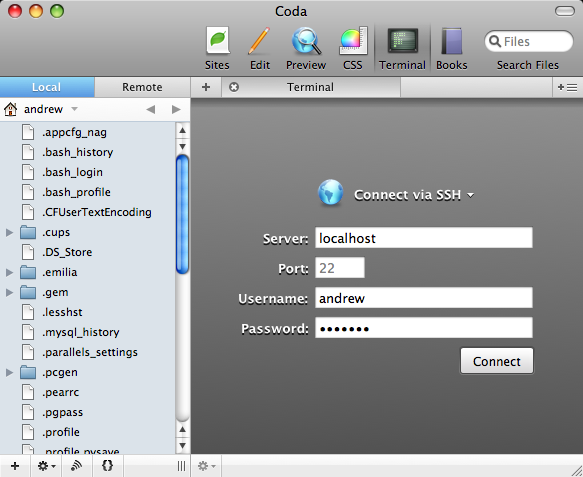
One of Coda’s features allows you to work in a terminal window from within the IDE. While this is quite excellent for tweaking server settings and such, by default it appears to work only for remote connections. The good news is that it’s really simple to set it up to work with local files as well.
Sharing Pref Pane
Coda Terminal Login
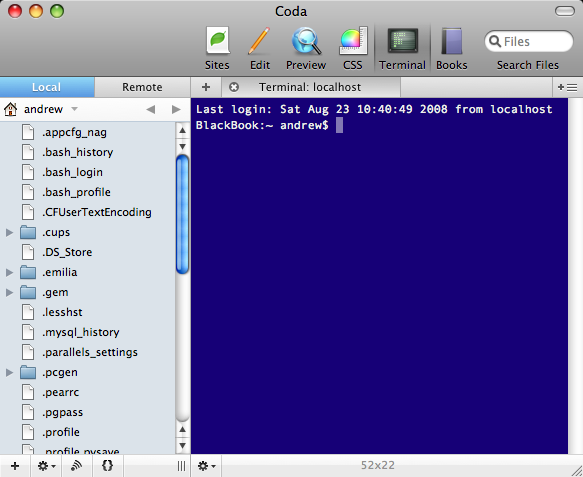
VoilĂ !
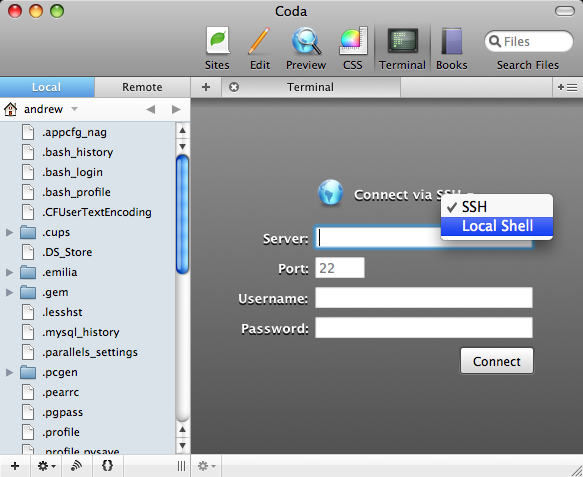
Select Shell Source
Coda Local Terminal Session
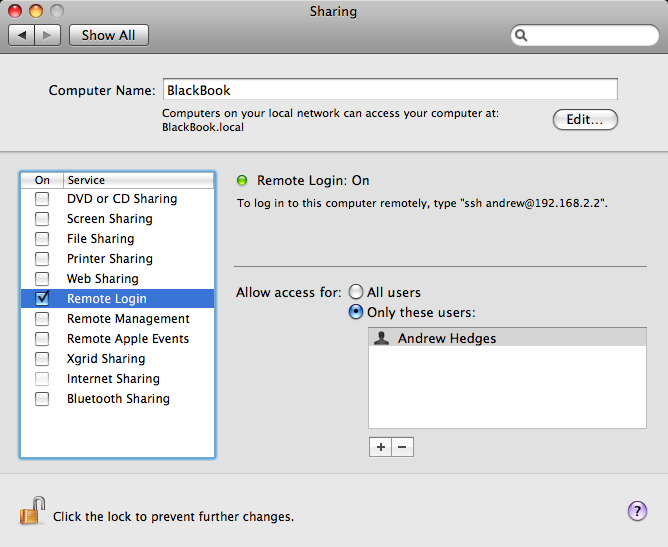
What you do is go to your Sharing preference pane, found in System Preferences (see image to the right) and turn on Remote Login, if it’s not already enabled.
Now, you can just go into Coda, hit the Terminal tab, and log in to your local system. Use localhost as the server name and your system login credentials as the username and password and Coda will connect to your local file system allowing you to do anything you could do directly in Terminal.app.
There is no step 3.
And, because I haven’t gushed enough about Coda… If you do Dashboard Widget development, you really owe it to yourself to check out Coda. I set up a site that uses my Widgets folder as its root directory. This means I can just open that site, right-click on a widget, choose “Show Package Contents” and I have access to all of its innards from within the IDE. That, and the preview pane uses WebKit (the same rendering engine used by Widgets themselves), so it’s great for getting started laying out your widget’s design. This is all, of course, if—like me—you don’t use Dashcode…
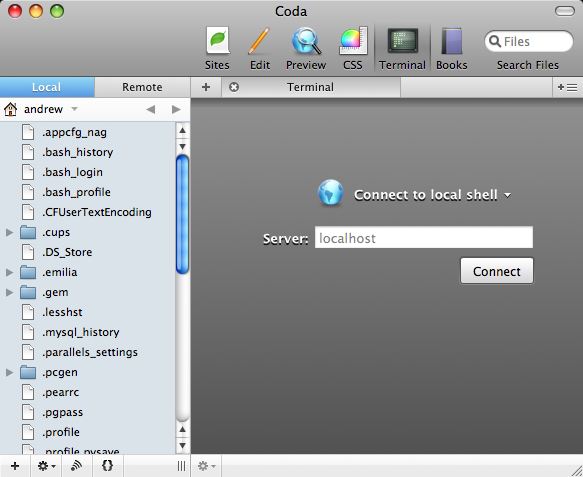
Turns out I was too clever (and too blind, apparently!) for my own good. The smart folks at Panic anticipated the need to connect to a local shell. (Didn’t I say? They’re good!)
In the Terminal tab in Coda, just click on the select list and choose “Local Shell” (see screenshot to the right). I verified that this works, regardless of whether Remote Login is enabled. Thanks to “bardiir” from the Coda Users Google Group for enlightening me!
Short URL to this article:
Tweet this article!
Comments close automatically after 90 days.
Still have something to say? Drop me a line!